Before a job can be dispatched, at least one inspector must be assigned and marked as confirmed.
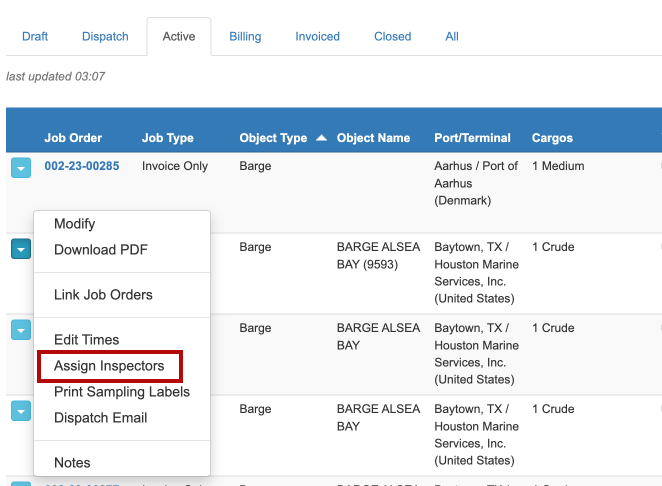
To assign an inspector to a Job Order, ensure that the user has dispatching permission and select Assign Inspectors beside the Job Order's number in the list:
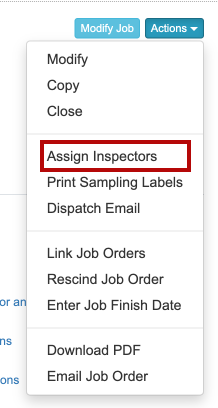
Note: this can also be performed by opening the Job Order in read-only mode and selecting this menu item from the Actions menu:
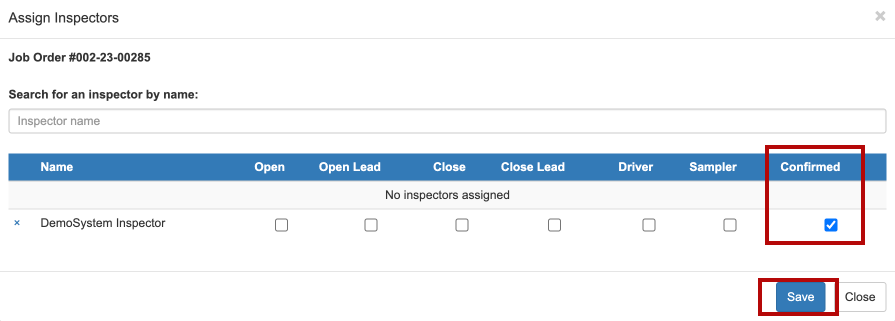
The Assign Inspectors pop up will be displayed where inspectors can be searched for by name and then selected.
To assign an inspector, select the Confirmed check box for the inspector and click Save:
For information about the codes that can be set for inspectors, see Inspectors.
Was this article helpful?
That’s Great!
Thank you for your feedback
Sorry! We couldn't be helpful
Thank you for your feedback
Feedback sent
We appreciate your effort and will try to fix the article